
Showing posts with label researching. Show all posts
Showing posts with label researching. Show all posts
Monday, 8 June 2020

Tuesday, 18 February 2020
mosquito census
Did you know there are more than 13 native species of mosquitoes? Help out researchers by catching and posting mosquitoes to them.
Watch the fun video and check out the website census info
Watch the fun video and check out the website census info
Monday, 2 September 2019
Jobs from pasture to plate

You might love programming robots, working with animals or protecting the environment. Check out Growing NZ which looks at career opportunities for you within NZ's food & fibre industry. This covers about everything from growing quality food, wood and wool through to making those things into products like ice cream, burger patties, pizza boxes and clothing for fashion stores.
Monday, 28 November 2016
Tuesday, 1 March 2016

Friday, 19 February 2016
Have your say

Friday, 27 March 2015
Field of Remembrance

As we don't have a field to put these symbolic crosses of soldiers who died in WW1, we have decided on a 'Window of Remembrance' to silently remember their sacrifice. Hopefully passers-by will also remember. The Online Cenotaph might help you to find out about some of the names on the crosses or about a family member.
Friday, 26 September 2014
Climb Mt Everest

Friday, 6 June 2014

Wednesday, 28 May 2014
Visual online dictionary
 To quote the website, "The Visual Dictionary Online is an interactive dictionary with an innovative approach.
From the image to the word and its definition, the Visual
Dictionary Online is an all-in-one reference. Search the
themes to quickly locate words, or find the meaning
of a word by viewing the image it represents."
Monday, 21 April 2014
Make online reading easier

The free extension Fokus highlights selected text and darkens the rest of your Chrome or Firefox browser window. This makes it a great tool to block out distractions online.
The extension is simple to use. In Chrome, once it's installed, you select the text you want to focus on. It will highlight that in a spotlight and fade out the rest of the page in a dark frame. You can set the opacity of the darkened background, the padding of the highlighted part, and even include a key modifier if you don't want it to be always activated. In Firefox, you will have to hit the "F" icon in the toolbar and then highlight the text.
Wednesday, 19 February 2014
Research Skills
The Big 6
 For investigating sources of information from databases, encyclopedias and the Internet is “the Big Six.” This process sets out the steps as follows:
1. Define the task – what needs to be done?
2. Information Seeking Strategies – what resources can I use?
3. Location and Access – where can I find these resources?
4. Use of information – what can I use from these resources?
5. Synthesis – what can I make to finish the job?
6. Evaluation – how will I know I did my job well?
For investigating sources of information from databases, encyclopedias and the Internet is “the Big Six.” This process sets out the steps as follows:The Kentucky Virtual Library How to Do Research
 The Kentucky Virtual Library has an online poster-style How to Do Research site for guiding younger pupils through the steps to finding the information they need on any topic, whether in print form, multimedia or online. Presented in a visual comic/game style it explains in child-friendly language the process to find the information being sought. And each page of advice is presented as a set of easy to digest straightforward steps, breaking down each task (whether finding the information, recording it, evaluating it, or presenting it) in cartoon-style visual interactive style making it attractive to primary users.
Ergo – Teaching Research Skills
 Ergo – Teaching Research Skills from the State Library of Victoria, Australia, is a guide for you to get help finding the information you need for a school assignment. The guide provides helpful explanations, hints, tips and further resources for each of the steps: Define the task, Locate information, Select resources, Organise notes, Present the ideas, Evaluate your work.
All About Explorers
 All About Explorers is a webquest which guides you through making better use of information that is presented online. It helps you to evaluate what you read online, and how to select from the information you do find.
Google Tools for Better Searching
 Google A Day is a daily-changing search challenge. (You can go back to previous challenges if you wish). Answer the question by using a search engine. If you are not sure how to get started, click on the hint to get a bit of help. And the answer is provided. There are also links to tips and techniques for better Internet searching.
 Get More Out of Google is a poster with advice and practical tips for making more eficient use of Google search engine.
Thursday, 24 October 2013
Do you know how to search?
Reproduced from http://www.edudemic.com/student-search-skills/
Quotation Marks:
Use quotes to search for an exact word or set of words. This is useful when you want something like quotes, song lyrics or text from a an exact historical time period.
- Example: “The Great Chicago Fire”
Dashes (or minus sign):
Use this symbol directly before a word to help exclude unwanted information from your search
- Example: Great Chicago Fire -soccer
Two Periods:
Use this to help you find information between those two numbers. For example you might want to try:
- Example: Great Chicago Fire October 8..10
Site Search:
For a look through the Chicago HIstory Museum site only
- Examples: Great Chicago Fire site:chicagohs.org
site:Chicagotribune.com
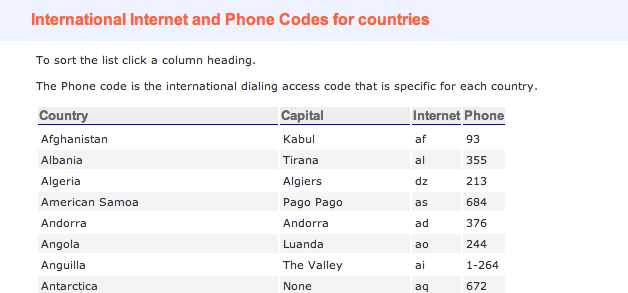
Use Country Codes to Look Up News Stories:
Students should gather every side and view possible on current events, and historical news stories. Not just those that are seen through the red, white and blue colored lenses of our media. To do this all they need is to search using different country codes. For example, if you wanted to get to Google Korea all you would have to do is search using the country code of Kr for Korea.
Try it yourself first by going to Google Korea – www.google.co.kr.
Below are a few of the country codes. You can click on the image to get a complete list.
The Filter Bubbles
Did you know that while you are searching, you are inside of an invisible bubble? The results you get when you search are coming to you through filters. These filters determine, based on your past searching history, what results you would most likely want – often leaving out opposing viewpoints. Basically, what comes back to you in your search results depends on your past searches, likes and location. The scary part is that what gets filtered out of your search results is not decided by you but by the algorithms of the companies that are providing you with the results.
Two different people can get two very different search result pages. Author Eli Pariser explains this concept in his short TED Talk (link to talk below). Teaching students about the filter bubbles is crucial for helping them understand the hidden power behind search results.
Due to the hidden power of filter bubbles, it is helpful to teach students how to search in the Chrome browsers incognito mode by going to File –>New Incognito Window. This way you don’t reveal who you are to search engines and they can’t filter your results. To learn more watch this very inforamtive TED Talk by Eli Pariser.
Eli Pariser TED Talk
Finding Primary Sources
Today, finding primary sources can be quite easy. However, it can be a serious way for students to better understand history, by hearing from the people who witnessed the event and other real life accounts. Primary sources have always had strong educational value and now they are at our fingertips. Teachers should be using these more than ever to teach history and other subjects where reading first person accounts of real events can help fuel true empathetic understanding,
Below is a great one minute video on how to use google news to easily find primary sources.
Many of the ideas in this blog post came from a presentation by Tanya Avrith. You can follow her on Twitter @edtechschools.
Thursday, 25 April 2013
Subscribe to:
Posts (Atom)
Featured post

-
You must take a look at this hugely magnified image of a moth antennae and more:
-
http://openclipart.org/ Great game for anyone from about middle school age to test out their knowledge and understanding of fraction...


